Role of Captions, Titles, and Alt Text in Image SEO

There’s a lot of advice out there about image optimization. Compress your files. Use WebP or AVIF. Lazy load. All genuinely useful.
What gets far less attention is the text side of images, the alt text, the title, the caption. These aren’t minor details you fill in to feel thorough. They’re how Google figures out what your images actually show. Skip them and you’re basically making your images invisible to search engines.
What is image SEO and why does it matter?
Google doesn’t actually look at your photos, it reads the text around them. Filenames, alt text, captions. That’s what it has to go on.
Get those right and your images become searchable. Ignore them and even a great photo is essentially invisible. Google Image Search sends a surprising amount of traffic to sites that bother optimizing for it, most don’t.
There’s also an accessibility angle worth mentioning. Alt text is what screen readers use to describe images to visually impaired users. Good image SEO and good accessibility overlap more than people realize.
Alt text: The most important image SEO field
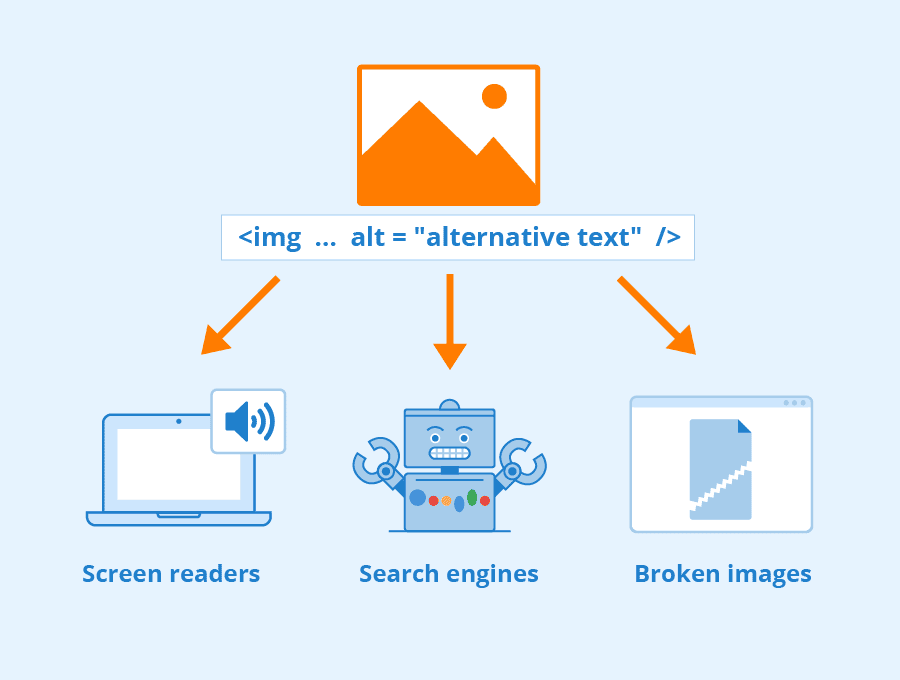
Alt text lives in the HTML, invisible to most users unless an image fails to load. Search crawlers and screen readers, though, read it every single time.
Writing it isn’t complicated, just describe what’s in the image, clearly and specifically.
✅ Good: Red leather sofa in a modern living room
❌ Bad: sofa furniture buy sofa cheap sofa
❌ Also bad: leaving it blank
A few things worth keeping in mind:
- Specific beats vague. “Golden retriever catching a frisbee in a park” beats “dog outside.”
- 50–125 characters is a reasonable target, enough to describe, not enough to ramble.
- Include a keyword only when it fits naturally. If you’re forcing it, leave it out.
- Skip “image of” or “photo of”, screen readers already announce it’s an image.
- Purely decorative images? Use alt=”” so screen readers skip them entirely.
If writing alt text manually for every image isn’t realistic, tools like ShortPixel Image Optimizer can generate it automatically, using both the image itself and the page context around it.
Image titles: Small detail, real impact
Image titles carry less SEO weight than alt text and most users never see them. They appear as a tooltip on hover in some browsers, that’s about it.
Still worth filling in, though. And there’s one detail most people overlook: WordPress pulls the image title directly from the filename on upload. A file named DSC_00482.jpg starts life on your site with a useless title. red-leather-sofa-living-room.jpg is immediately more informative for Google and for you.
Rename your files before uploading. It takes seconds and it’s one of the easier SEO wins available.
Image captions: Underrated but powerful
Captions sit directly below an image, visible to everyone. People who skim an article will often still stop to read them, they’re one of the most-read elements on any page.
From an SEO standpoint, Google treats captions like any other on-page text, not metadata. A good caption reinforces the topic of the surrounding content and creates a natural spot to include relevant keywords in a way that reads well.
Not every image needs one, though. Decorative images don’t. A caption under a background graphic just looks odd. They earn their place when the image actually needs context, a chart, a tutorial step, a before-and-after. If removing the caption wouldn’t change anything for the reader, it probably shouldn’t be there.
Alt text vs. title vs. caption: Quick comparison
Alt text is the one field you can’t skip. Search engines and screen readers rely on it most. If you only do one thing, do this.
Image title is a short supporting label, less SEO weight, but worth filling in. Much easier when your filename is already descriptive.
Caption is visible to everyone and treated by Google as regular page content. It’s the most natural place to work in keywords because it’s written to be read by actual humans.
Common mistakes to avoid
Blank alt text is the most common issue. It leaves search engines and screen reader users with nothing to go on.
Keyword stuffing in alt text is something Google actively picks up on. “leather sofa buy leather sofa discount sofa” helps nobody and can actively hurt your rankings.
Copy-pasting the same description across multiple images. Each image is different, the alt text should be too.
Filenames like IMG_5823.jpg. It’s the first signal Google gets about an image. A descriptive filename costs nothing.
Identical text across all three fields. Alt text, title, and caption each do a different job. Using the same sentence for all three is a missed opportunity.
How to handle image SEO at scale
For a small site, writing alt text manually is fine. For anything bigger, it falls apart quickly. Images get uploaded without descriptions, old posts never get revisited, and the gaps pile up.
ShortPixel Image Optimizer has an AI Image SEO feature built into WordPress that handles this automatically. It pulls context from the page the image is on, post title, surrounding content, site-level settings, rather than just scanning the image in isolation. The result is alt text that fits where the image actually appears.
Bulk processing covers an existing Media Library in one go, and new uploads get descriptions automatically. It supports 130+ languages and produces output aligned with WCAG accessibility guidelines. Since the same plugin handles image optimization too, there’s no need to manage separate tools. You can read more about how it works in our guide to adding SEO alt text, titles, and descriptions in bulk.
Conclusion
Alt text, titles, and captions are fields most sites either skip entirely or fill in without much thought. Used properly, they help Google understand what your images show, improve visibility in image search, and make your content more accessible.
The basics aren’t complicated, describe the image accurately, use clean filenames, add captions only where they genuinely help. That alone puts you ahead of most sites.
FAQs
What is alt text in images?
It’s a written description added to an image in the HTML. Search engines use it to understand what the image shows, and screen readers use it to describe images to visually impaired users.
Does alt text affect SEO?
Yes, meaningfully. It’s a primary signal for image indexing and helps images appear in Google Image Search. It also contributes to the overall relevance of the page it’s on.
What’s the difference between alt text and an image title?
Alt text is the main descriptive field and carries more SEO weight. The title is a shorter label that shows as a tooltip on hover. Both are worth filling in, but alt text is the priority.
Do captions help with SEO?
They do. Google reads captions as regular page content, not just metadata. They’re also one of the most-read parts of any page, so they serve readers and search engines at the same time.
How long should alt text be?
Between 50 and 125 characters works well, descriptive enough to be useful, short enough to stay focused. Skip “image of” or “photo of.”
Can I generate alt text automatically?
Yes. ShortPixel Image Optimizer generates alt text, titles, captions, and descriptions using AI directly in WordPress, with bulk processing for existing images and auto-generation for new uploads.
Try ShortPixel on WordPress for free!
Automatically generate AI-powered alt text, titles, and captions for all your images and optimize them at the same time.