Does WordPress 7.1 Optimize Your Images?

Short answer: not really and if you’ve read the release notes, you already know why.
WordPress 7.1 shipped on August 19, 2026, and one of its headline features is client-side media processing: your browser now handles image compression and thumbnail generation before the file ever reaches your server. It’s a genuinely useful engineering upgrade. It is not, however, the same thing as image optimization and the gap between the two is exactly what this post is about.
Quick Takeaways
- WordPress 7.1 moves image processing from your server to your browser, using a WebAssembly build of the libvips library.
- The result is images that are, on average, about 15% smaller than the ones WordPress generated before, not 15% smaller than the original file, just smaller than WordPress’s old GD/Imagick output.
- It only touches new uploads. Everything already sitting in your Media Library is untouched.
- It applies one fixed compression setting to every image, regardless of what’s actually in the picture.
- It doesn’t create next-gen formats for every visitor, doesn’t deliver from a CDN, and doesn’t give you a way to restore an original if you change your mind.
What actually changed in WordPress 7.1
To be fair to the WordPress core team, this release fixes a real, long-standing problem. For years, uploading a large photo could blow past your host’s PHP memory limit or simply time out, especially on shared hosting. WordPress 7.1 solves that by pushing the work into the browser instead.
Here’s what’s genuinely new:
- Client-side processing. Compression, thumbnail generation, and EXIF rotation now run in your browser via
wasm-vips, a WebAssembly build of the libvips library, instead of relying entirely on your server’s GD or Imagick setup. - Modern format support. HEIC photos from iPhones, AVIF files, and HDR gain maps are now decoded and handled automatically, even on hosts that never supported them server-side, but WordPress cannot generate WebP or AVIF for you.
- A better upload pipeline. Uploads retry automatically if a connection drops, and progress is easier to follow.
- A new media editor. Cropping, flipping, rotation, and metadata editing now live in one modal, available from both the Image and Cover blocks.
None of that is a gimmick. If you’ve ever watched an upload fail halfway through, the memory-limit fix alone is worth having. But “processes your image without crashing the server” and “optimizes your image” are two different claims, and WordPress 7.1 only really delivers on the first one.
Where it stops short of actual optimization
Here’s the part the release notes don’t lead with.
It’s one fixed setting for every image. The default quality is set to 0.82 across the board, whether you’re uploading a busy product photo, a flat screenshot, or a portrait with lots of skin tones. There’s no per-image analysis of what that picture can actually afford to lose.
It doesn’t touch your existing library. If you’ve been running your site for more than five minutes, most of your images were uploaded before August 2026 and 7.1 has no effect on any of them. Even outlets covering the release have noted that these changes “do not automatically optimize every image that is already stored in the Media Library.”
It depends on your visitor’s browser. Client-side processing currently requires Chromium 137+ (Chrome or Edge). On Firefox, Safari, or an older browser, WordPress quietly falls back to the same server-side GD/Imagick pipeline it’s always used, no improvement at all.
There’s no delivery layer. WordPress 7.1 can convert a HEIC upload to JPEG. It won’t automatically generate WebP or AVIF versions and serve the right one to each visitor’s browser, and it won’t put your images on a CDN.
There’s no undo button. Once an image is processed and the sub-sizes are generated, that’s what you’re serving. There’s no built-in way to dial the compression back up if a specific image doesn’t hold up.
15% vs. up to 80%: the numbers side by side
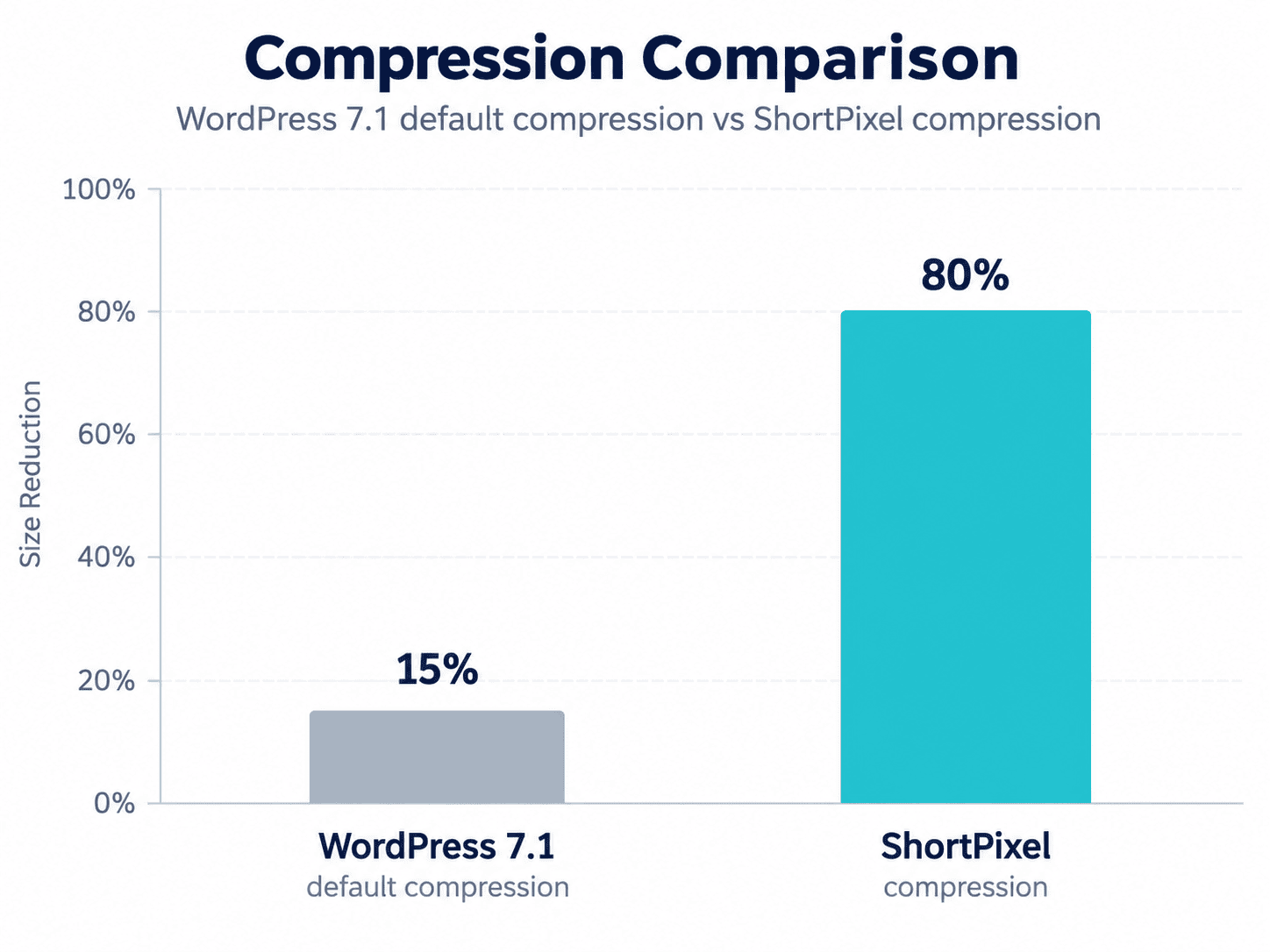
The 15% figure isn’t a guess, it’s the number WordPress’s own core team has published. Their announcement describes libvips producing JPEGs “reduced ~15% with MozJPEG like encoding” compared to the old GD/Imagick output. That’s a real, welcome gain. It’s also a ceiling, not a floor, every image gets roughly the same treatment, whether it needed it or not.
Compare that with how SmartCompress, ShortPixel’s own compression technology, approaches the same problem. Instead of applying one quality number to every file, SmartCompress runs each image through multiple optimization passes and checks the result against the original using the structural similarity index (SSIM), a measurement of how close the compressed version actually looks to the source, not just how small the file got. It keeps optimizing until it finds the smallest file size that’s still visually indistinguishable from the original, then stops.
In ShortPixel’s own published testing, a sample image dropped from 978 KB to 213 KB using Glossy compression, a 78% reduction while comparable tools using fixed quality settings (including a flat quality-82 setting, the same ballpark WordPress 7.1 now uses by default) landed at 33–38% with visibly softer results. Depending on the image and the compression level you choose, ShortPixel routinely gets up to 80% smaller, with no visible quality loss.
| WordPress 7.1 (default) | ShortPixel | |
|---|---|---|
| Compression approach | One fixed quality setting (0.82) for every image | Adaptive, per-image optimization checked against SSIM |
| Typical savings | ~15% smaller than WordPress’s previous output | Up to 80% smaller than the original, no visible quality loss |
| Applies to your existing library? | No, new uploads only | Yes, bulk-optimizes everything already on your site |
| Next-gen formats (WebP/AVIF) served to visitors | No | Yes, with automatic fallback for unsupported browsers |
| CDN delivery | No | Yes |
| Works regardless of visitor’s browser | No, requires Chromium 137+, otherwise falls back with zero gain | Yes, optimization happens before the image ever reaches a visitor |
| Restore the original anytime | No | Yes |
Why “smaller file” isn’t the same as “optimized image”
This is really the crux of it. A fixed quality setting is a blunt instrument, it doesn’t know or care what’s actually in the image. A flat color background can be compressed hard with zero visible loss; a detailed photo with fine gradients can start showing artifacts at the exact same setting. Apply one number to every image on your site, and you’ll always be leaving savings on the table for the simple ones while risking visible quality loss on the complex ones.
That’s the gap dedicated image optimization is built to close. If you want the deeper mechanics of how quality assessment actually works, SSIM scores, why “quality 82” isn’t a meaningful standalone number, and how ShortPixel decides when to stop compressing, we cover it in more detail here.
What you still don’t get without a dedicated plugin
Even taking WordPress 7.1’s improvements at face value, here’s what’s still missing if image processing in core is the only tool in your stack:
- Bulk optimization of your entire existing Media Library, not just images uploaded from now on.
- Automatic WebP and AVIF delivery to every visitor, with the right format served for the right browser, see also our breakdown of AVIF vs. WebP if you’re deciding between the two.
- CDN-backed delivery, so images are resized and served from a location close to each visitor, not just compressed once and left on your own server.
- Lossy, Glossy, and Lossless modes you actually control, instead of one setting baked into core.
- PDF compression, which core WordPress doesn’t touch at all.
- A one-click way to restore originals if a compressed image doesn’t meet your standards.
- Consistent results regardless of your visitor’s browser, since optimization happens before the image is ever served, not conditionally in their browser.
If you want a broader view of how the major plugins stack up on exactly these points, we keep an updated comparison of the best WordPress image optimization plugins.
Should you use WordPress 7.1 and ShortPixel together?
Yes, they’re not competing with each other. WordPress 7.1’s client-side processing mainly solves a server-side problem: memory limits, timeouts, and upload reliability on large files. That’s a genuine win, especially on shared hosting. It just isn’t designed to solve the optimization problem, getting every image, old and new, as small as it can possibly be without anyone noticing.
Running ShortPixel alongside WordPress 7.1 means your uploads still get the benefit of a smoother upload pipeline, but every image, new or years old, also gets run through adaptive, SSIM-checked compression, converted to next-gen formats, and optionally served from a CDN. One handles the plumbing. The other actually optimizes the images running through it.
If you’re not sure where to start, our guide to reducing image file size is a good next read, or you can just install ShortPixel and let it optimize your next upload automatically.
FAQs
Does WordPress 7.1 replace the need for an image optimization plugin?
No. It improves how images are processed during upload and reduces server load, but it doesn’t optimize your images, doesn’t touch your existing Media Library, and doesn’t handle format delivery or CDN distribution.
How much does WordPress 7.1 compress images by default?
WordPress’s own core team reports that libvips produces JPEGs roughly 15% smaller than the previous GD/Imagick output, at a default quality setting of 0.82. This means that in the best case scenario, your images may be 15% smaller.
Does WordPress 7.1 optimize images already in my Media Library?
No. Client-side processing only applies to images uploaded after you update to 7.1. Everything uploaded before that is untouched unless you re-upload it or use a plugin that can bulk-optimize existing files.
Which browsers support WordPress 7.1’s client-side image processing?
It currently requires a Chromium-based browser (Chrome or Edge) version 137 or newer. On other browsers, WordPress falls back to standard server-side processing with none of the size improvements.
Try ShortPixel on WordPress for free!
Easily optimize your pictures and generate WebP/AVIF in bulk using ShortPixel Image Optimizer.