Progressive JPEG vs Baseline JPEG: Does It Still Matter in 2026?


Progressive JPEG used to be one of those recommendations you’d see everywhere. Almost every image optimization guide mentioned it. Faster perceived loading, better experience on slow connections, fewer visual artifacts while images download.
None of that was wrong.
But the web doesn’t look the same today.
WebP is now standard across browsers. AVIF adoption keeps expanding. HTTP/2 changed how resources load. Mobile networks improved massively, even if they’re still unpredictable in certain conditions. Because of all this, many older performance rules simply don’t carry the same weight anymore.
Yet JPEG hasn’t gone anywhere. That’s why the progressive vs baseline question hasn’t really disappeared. It’s just become more situational.
So yes, progressive JPEG still matters. Just not for the same reasons it once did.
What baseline and progressive JPEG actually mean
Both baseline and progressive images are standard JPEG files. Same extension, same compression algorithm, identical visual result once the image is fully loaded.
The distinction lies entirely in how image data is stored within the file and how browsers render that data during download.
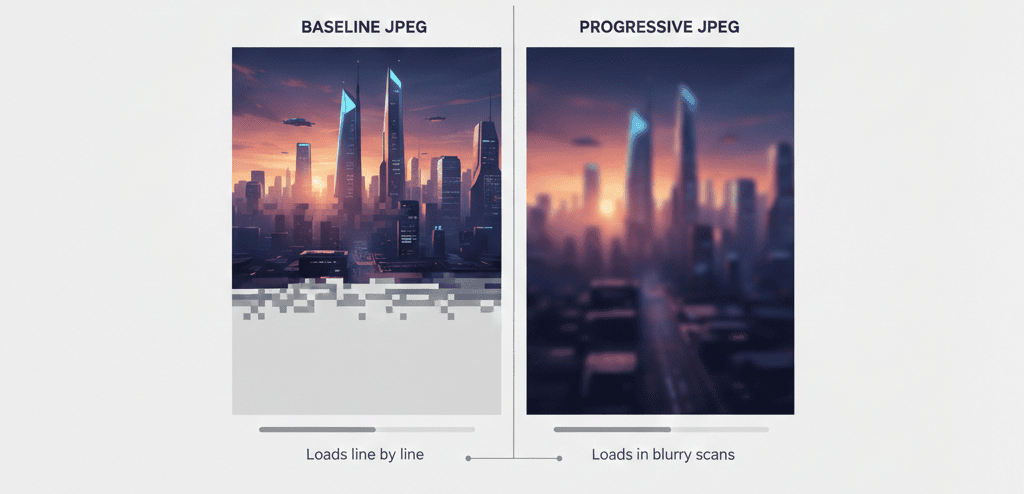
A baseline JPEG stores pixel information sequentially from top to bottom. As bytes arrive, the browser renders rows in order. Under fast connections, this behavior is rarely noticeable. On slower or unstable networks, users may literally watch the image load line by line. This can feel awkward, especially on larger images.
Progressive JPEG behaves differently. Instead of strict sequential storage, the image is encoded in multiple scans. The first scan displays a blurry but complete preview of the entire image. Each additional scan refines detail until the final quality level is reached. The final image looks the same in both cases. What changes is how users experience the loading process, and that difference is where progressive JPEG derives its value.
Does progressive JPEG produce smaller files?
Often, yes, though expectations should remain realistic.
For most web images above roughly 10KB, progressive encoding frequently results in files that are slightly smaller than baseline equivalents at comparable quality. The reduction is typically modest, commonly in the 1–3% range, but consistent enough to be measurable at scale.
The explanation lies in how JPEG compression handles frequency data. Progressive encoding allows similar data across multiple blocks to be grouped and encoded more efficiently. Sequential baseline storage does not always benefit from the same patterns.
For very small images, however, progressive encoding may increase file size. The format introduces structural overhead, which becomes proportionally larger as the image itself shrinks. This is exactly why blanket rules rarely produce optimal results, per-image evaluation is the safer strategy.
Does it still matter in 2026?
Yes, though the practical impact varies by context.
Perceived performance is still a real metric
Progressive JPEG does not change download speed. The number of bytes transferred remains identical. What changes is what users see while those bytes arrive.
On slower networks, progressive rendering provides immediate visual feedback. Users see a recognizable preview rather than a partially rendered image or blank placeholder. Even a blurry preview feels smoother than watching content paint itself from top to bottom.
Core Web Vitals metrics like Largest Contentful Paint measure completion events, not intermediate scans. Progressive JPEG won’t directly move those scores. Still, perceived responsiveness affects how users interact with a page, especially under slower network conditions, and that has real consequences for engagement and bounce rates.
HTTP/2 reduced historical differences but did not eliminate them
HTTP/1.1 imposed connection limits that made progressive rendering more visibly beneficial. HTTP/2 introduced multiplexing, allowing multiple assets to share connections. Images now load more in parallel, which reduces, but does not erase, progressive vs baseline differences.
Real-world performance rarely behaves like textbook examples. Shared hosting environments, uneven caching layers, distant CDN edges, and variable mobile networks continue to shape user experiences. Under these conditions, rendering behavior can remain visible.
WebP and AVIF change priorities but not fallback behavior
Modern formats like WebP and AVIF offer dramatically better compression efficiency than JPEG. JPEG, however, remains deeply embedded in the web ecosystem. Fallback images continue to serve older browsers, embedded web views, social scrapers, and SEO tools.
This is something we observe constantly through ShortPixel. Even on sites that fully embrace WebP or AVIF, JPEG fallbacks remain widely requested. In these scenarios, encoding strategy still matters, and for larger fallback images, progressive JPEG generally produces a smoother perceived loading experience.
Where the difference is most visible
Image size plays a decisive role.
For very small images, progressive vs baseline differences are negligible. Files download too quickly for rendering order to matter. For large images, especially hero visuals or full-width content images, progressive behavior becomes much more noticeable. Users see an immediate low-detail preview rather than a partially rendered frame.
This distinction becomes even more relevant on pages containing multiple large images. Blog posts, product grids, and gallery layouts benefit when images render progressively. Users always see complete placeholders rather than fragmented loading states stacked down the page.
Progressive JPEG vs. lazy loading
These mechanisms solve entirely different problems.
Lazy loading determines when an image begins downloading. Images below the viewport are deferred until the user scrolls toward them, reducing initial bandwidth usage. Progressive encoding determines how the image renders once the download has already started. One is a request-level optimization. The other affects rendering behavior. They complement rather than replace each other.
One important note: never apply lazy loading to images visible on page arrival. Hero images and anything above the fold should load immediately, otherwise you risk pushing your LCP score in the wrong direction.
How to check and convert your images

If you’re using ShortPixel Image Optimizer, you typically don’t need to worry about image encoding at all. During optimization, the plugin automatically evaluates each image and keeps whichever variant, progressive or baseline, produces the smaller file.
For those who prefer verifying things manually, checking is still easy.
In browser DevTools, throttle the connection to Slow 3G and reload the page. A baseline JPEG loads from top to bottom, while a progressive JPEG appears blurry first and gradually sharpens.
From the command line with ImageMagick installed:
identify -verbose image.jpg | grep InterlaceIf the output shows Plane, the image is progressive. If it shows None, it’s baseline.
For manual conversion without re-encoding, jpegtran works well:
jpegtran -progressive -copy none input.jpg output.jpgWith ImageMagick (which re-encodes the image):
convert input.jpg -interlace Plane output.jpgFor most WordPress workflows, though, manual conversion rarely scales well. Letting ShortPixel handle encoding decisions automatically is usually the simpler and more consistent approach.
The practical takeaway
Progressive JPEG is no longer a universal requirement, but it remains useful.
For JPEG-heavy sites, it often means slightly smaller files and a smoother loading experience for larger images. For sites already on WebP or AVIF, it mainly affects fallback images, and those still reach a real portion of users.
Not the most critical item in your image stack. But worth getting right, and worth automating so you don’t have to think about it on every upload.
FAQs
Can I tell if a JPEG is progressive or baseline?
Yes. In your browser, you can throttle your connection in DevTools to Slow 3G and watch how the image renders on reload. In Photoshop, this appears in the Save for Web dialog. From the command line, run identify -verbose image.jpg | grep Interlace, Plane indicates progressive, None indicates baseline.
Should I convert all my existing JPEGs to progressive?
For larger images, conversion is usually worthwhile. You’ll typically get a slightly smaller file and a better loading experience on slower connections. Very small images may see minimal benefit or a slight size increase. Per-image evaluation remains the safest strategy.
Does progressive JPEG improve Core Web Vitals?
Not directly. LCP measures completion timing rather than intermediate scans. For Core Web Vitals improvements, prioritize format selection, compression level, and avoiding lazy loading on above-the-fold images.
Is progressive JPEG supported in all browsers?
Yes. Chrome, Firefox, Safari, and Edge all render progressive JPEG images correctly. The old compatibility concerns around Safari haven’t been relevant for several years.
What about interlaced PNG?
Similar concept, very different outcome. Interlaced PNG files can run 30–40% larger than non-interlaced equivalents, making it generally not recommended for web use. If you’re working with PNG images, focus on compression and consider converting to WebP instead.
Try ShortPixel on WordPress for free!
Easily optimize your pictures and improve your website’s speed using ShortPixel Image Optimizer.