How to Prevent AI Models from Training on Your Website


WordPress makes publishing content, including images, incredibly easy. Once a file is uploaded, it’s instantly available through a public URL, a major advantage, but also a potential risk.
As AI models increasingly rely on publicly accessible data, many site owners are questioning how much control they truly have over their content. While there’s no foolproof way to block all access, WordPress does offer practical tools to reduce exposure and signal crawler preferences.
This guide focuses on WordPress-specific solutions, from image-level controls to broader, site-wide protections that help limit unnecessary access.
How AI crawlers typically access WordPress sites
AI crawlers don’t behave like human visitors. They don’t click on links or interact with pages. Instead, they send direct requests to files, HTML, images, media, and other assets, and process those elsewhere.
Because of this, techniques designed to discourage humans (like disabling right-click or adding overlays) don’t meaningfully affect automated systems. To have an impact, controls need to operate at the delivery, crawler policy, or server level.
Plugins that help restrict access to images
ShortPixel Image Optimizer
While ShortPixel Image Optimizer is best known for image optimization and performance, it also sits directly in the image delivery path, making it a natural place to add AI-related directives without extra plugins or server configuration.
Here’s how to enable AI training directives:
Install & activate the ShortPixel Image Optimizer plugin.
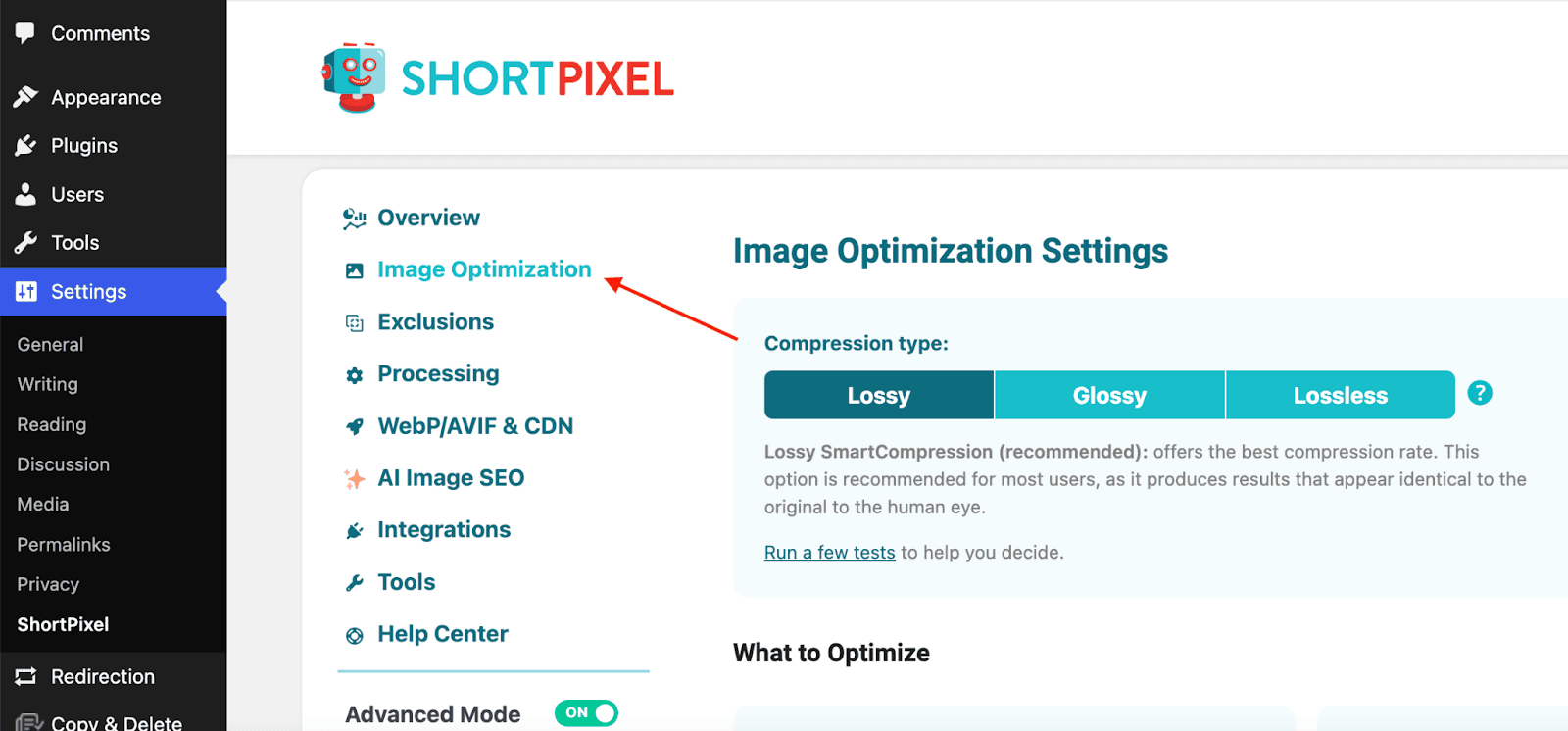
Go to Settings → ShortPixel → Image Optimization.
Scroll to the section “Allow or prevent your images from being used for AI/ML training”.
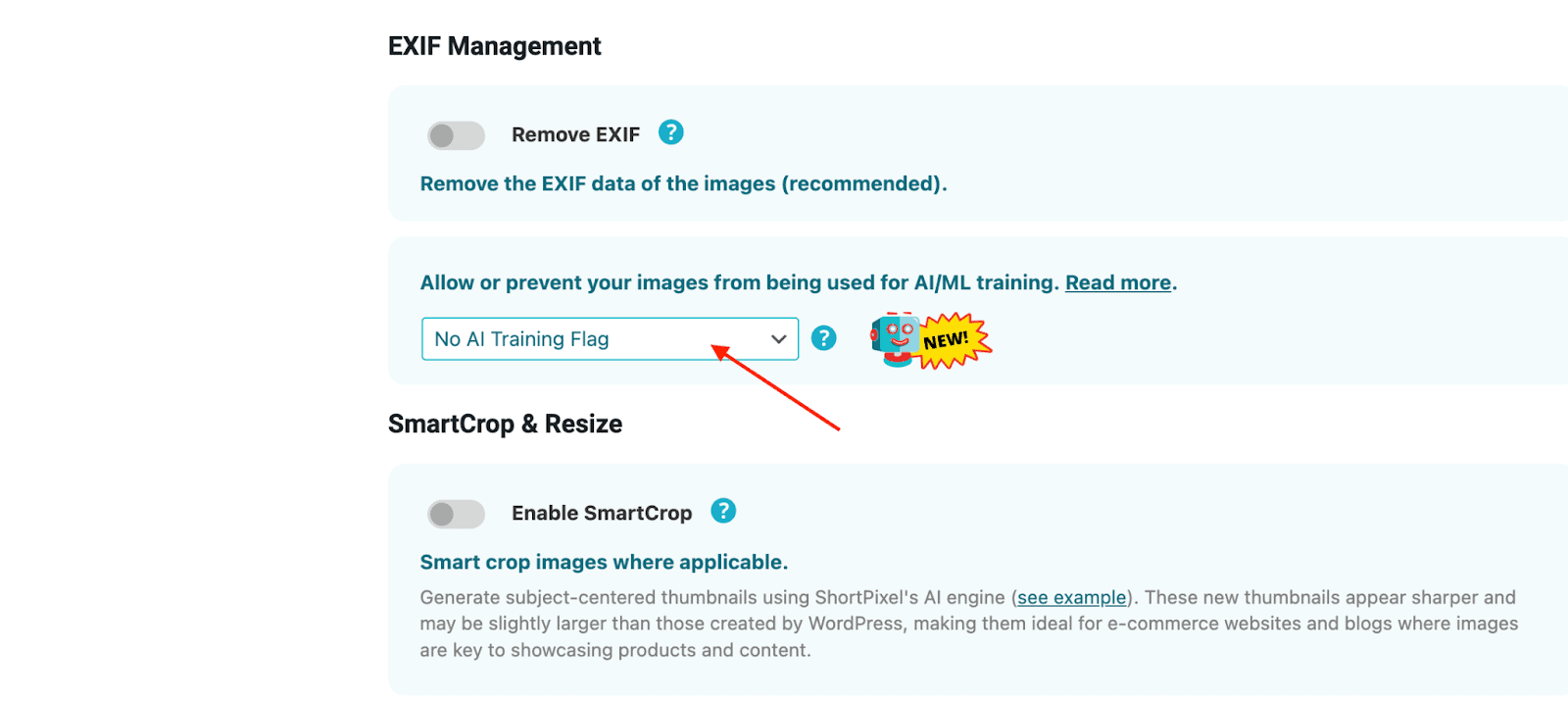
From the dropdown, select “No AI Training, Allow SEO Indexing” (or another option depending on whether you want to allow SEO indexing).
Save your changes.
Images remain accessible to users and search engines, while clearly signaling that they shouldn’t be used for AI training. Most crawlers that identify themselves do respect these directives, making it a practical first layer of protection.
Plugins that restrict AI crawlers site-wide
If you want to go beyond image-specific controls, there are WordPress plugins designed to manage crawler access across your entire site.
Block AI Crawlers
Block AI Crawlers focuses on discouraging known AI training bots by managing access through crawler user agents and robots.txt rules. It’s a lightweight option designed to clearly communicate your site’s policy without active request-level blocking.
Key features:
- Manages access using robots.txt rules
- Targets known AI crawler user agents
- Simple, low-configuration setup
Use case: Simple, policy-based discouragement of known AI bots.
Dark Visitors
Dark Visitors takes a broader approach by combining crawler management with visibility into automated traffic across your site.
Key features:
- Analytics for AI crawlers and scrapers
- Monitor-only mode to test rules before blocking
- Automatic robots.txt generation
- Optional server-level enforcement
Use case: Gaining insight into AI crawler activity before deciding what to block.
Bot Traffic Shield
Bot Traffic Shield focuses on active blocking based on known user agents, restricting automated traffic at the request level rather than only signaling preferences.
Key features:
- Blocks known AI crawlers and scraping bots by user agent
- Predefined and customizable bot lists
- robots.txt rule generation
- Request-level enforcement to reduce server load
Use case: Stronger, proactive enforcement against AI crawlers.
AI Scraping Protector
AI Scraping Protector is designed to reduce aggressive automated scraping activity by detecting and limiting suspicious request patterns.
Key features:
- Detects scraping and bot-like behavior
- Rate limiting for automated traffic
- IP-based blocking for repeated offenders
- Site-wide protection without affecting normal visitors
Use case: Protecting sites experiencing aggressive automated access.
Managing AI crawlers with robots.txt
For many WordPress sites, robots.txt is the simplest place to start. WordPress generates a virtual robots.txt by default, but placing a physical robots.txt in your root directory will override it.
Here’s an example that discourages known AI crawlers:
User-agent: GPTBot
Disallow: /

User-agent: Google-Extended
Disallow: /

User-agent: ClaudeBot
Disallow: /

User-agent: CCBot
Disallow: /

User-agent: anthropic-ai
Disallow: /
Keep in mind that robots.txt is a policy signal. Well-behaved crawlers respect it; others may ignore it.
Server-level blocking with .htaccess
If your hosting setup allows it, server-level rules provide stronger enforcement by blocking requests before WordPress loads.
Always back up your .htaccess file before making changes.
Block AI crawlers entirely
<IfModule mod_rewrite.c>

RewriteEngine On

RewriteCond %{HTTP_USER_AGENT} (GPTBot|Google-Extended|CCBot|anthropic-ai|ClaudeBot|cohere-ai) [NC]

RewriteRule .* - [F,L]

</IfModule>
Block AI crawlers from image files only
<IfModule mod_rewrite.c>

RewriteEngine On

RewriteCond %{HTTP_USER_AGENT} (GPTBot|Google-Extended|CCBot|anthropic-ai|ClaudeBot|cohere-ai) [NC]

RewriteCond %{REQUEST_URI} \.(jpg|jpeg|png|gif|webp|svg|bmp|tiff)$ [NC]

RewriteRule .* - [F,L]

</IfModule>
These rules stop unwanted requests before WordPress processes them, reducing exposure and server load. The main downside of this would be that AIs such as ChatGPT and Claude will not recommend content from your website if someone asks something relevant.
When a CDN makes sense
On managed WordPress hosting where server access is limited, a CDN (like Cloudflare) can add an extra enforcement layer. Blocking requests at the edge prevents unwanted traffic from reaching your server.
What doesn’t help much
Many commonly suggested techniques don’t meaningfully affect AI crawlers:
- Disabling right-click
- JavaScript overlays
- CSS-based hiding
These only affect human behavior and are easily bypassed by automated systems.
Putting it all together
A layered approach works best for most WordPress sites:
- Image-level signaling via ShortPixel
- Crawler directives via robots.txt
- Site-wide plugins (Block AI Crawlers, Dark Visitors)
- Request-level enforcement (Bot Traffic Shield, AI Scraping Protector)
- Optional server-level or CDN blocking
You don’t need every option. Even one or two layers can significantly reduce automated access.
Final thoughts
Preventing AI models from training on WordPress content isn’t about building a perfect barrier. It’s about reducing unnecessary exposure in a way that works with your site setup and maintenance workflow.
By combining image optimization, clear crawler signals, and practical protections, WordPress site owners can strike a sensible balance.
Try ShortPixel on WordPress for free!
Easily optimize all your images and generate AI Image SEO with ShortPixel Image Optimizer.