
I Batch Compressed 11,000 Images – Here’s What Happened


We built a batch compress script, and I finally had a chance to put it through a real test. Not a “here’s 20 photos from my camera roll” test.
I’m talking about thousands of images processed through ShortPixel from the command line, no GUI, no plugins, just bash and curl.
It uses the exact same compression algorithms as our online tools and WordPress plugin, just without the overhead of a user interface.
Here’s what I did, why it matters for WordPress sites specifically, or websites in general, and the actual numbers.
Test setup: Simulating a real WordPress media library
WordPress doesn’t just store your original upload. For every image you upload, it generates multiple resized versions, including thumbnail, medium, and large sizes, plus whatever your theme adds on top of that.
A site with 1,000 images in its media library often has 5,000 to 15,000 actual files on disk once you count all the generated sizes.
To simulate that realistically, I used 1,000 random images from the Google Open Images V7 dataset (CC BY 4.0), resized so no dimension exceeded 1,024px – roughly equivalent to WordPress’s “large” image size.
Then I used a simple Python script to generate 10 thumbnail variants per image, bringing the total to 11,000 files. This script also organizes them into 10 folders to make processing more efficient.
Starting size: 536.6 MB of real photographic content, diverse subjects, all JPEG.
How I ran it
I used shortpixel-optimize.sh, a zero-dependency bash script that handles the whole ShortPixel API workflow: upload, poll, download, backup, and logging. No Python, no Node, no jq. Just bash 4+ and curl.
My .env config for the test:
LOSSY=1
KEEP_EXIF=0
CONCURRENCY=4
API_WAIT=5
OVERWRITE=true
BACKUP_DIR=backup
Lossy mode 1 is ShortPixel’s standard lossy compression. EXIF stripped, 4 parallel workers, originals overwritten in place (the script automatically mirrors everything to the backup directory before touching a single file, so nothing is ever at risk).
First time you run it without a .env, the script walks you through an interactive wizard that covers your API key, compression settings, concurrency, output preferences, and backup directory.
After that it creates the .env and you’re set. In CRON or non-interactive environments, it skips the wizard and prints a warning instead.
The results
After processing all 11,000 images:
287.2 MB down from 536.6 MB. That’s 249.4 MB saved, a 46.5% reduction.
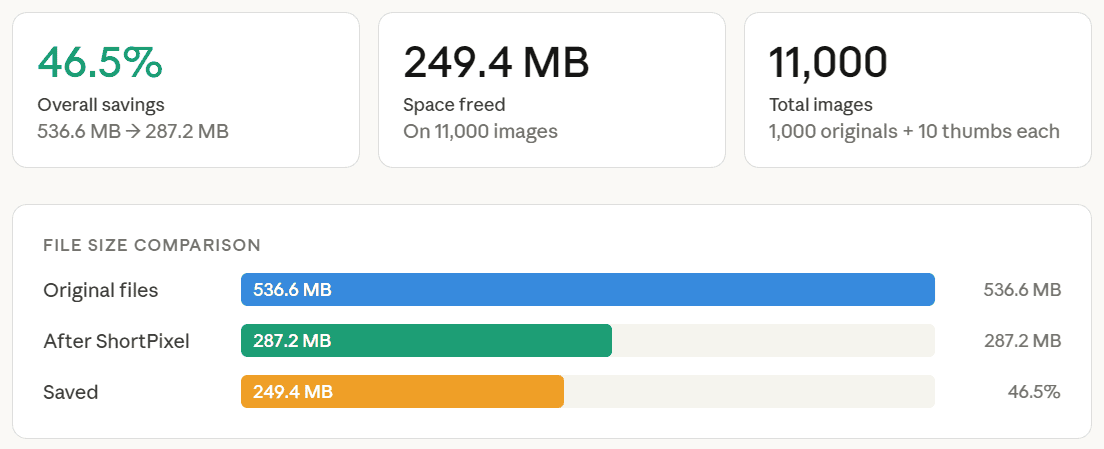
For a WordPress site context: if your media library is sitting at 500 MB on disk, you could realistically expect it to come down to around 265–270 MB with similar settings.
At scale, say a media-heavy news site or a photography portfolio with years of uploads, this translates directly into cheaper storage, faster backups, faster page loads, and reduced CDN egress costs.
The 46.5% figure is across mixed content. Portrait photos, landscapes, product shots, street scenes.
The dataset I used from Google is diverse enough that this isn’t a cherry-picked result. Flat graphics and illustrations would typically compress even more; highly noisy or already-compressed images would compress less.
What this means for your site
The 46.5% figure is the one worth sitting with.
Most WordPress sites accumulate images for years without ever running optimization across the full library.
If you’ve got 500 images uploaded, that’s potentially ~5,000 files on disk, and there’s a good chance a meaningful chunk of that storage is just… waste.
If you’re on WordPress, running it as a one-time batch job using a plugin like ShortPixel Image Optimizer is a clean approach, and the results here suggest it’s worth the time it takes to process everything.
Page speed is where it shows up for visitors
Disk savings matter for hosting costs, but the user-facing impact is page load time.
Unoptimized images are one of the most consistent contributors to poor LCP (Largest Contentful Paint) scores, which is the Core Web Vitals metric that measures how fast your main content appears.
A 46.5% reduction in file size means significantly less data transferred per page request, which feeds directly into faster load times, better LCP scores, and, for sites where Google traffic matters, a ranking signal that’s now working in your favor instead of against you.
Images sourced from Google Open Images V7, licensed CC BY 4.0.
Script used: github.com/short-pixel-optimizer/shortpixel-sh