ICC Profiles, EXIF, and Privacy: What Metadata to Keep vs. Strip

Most people don’t think twice about the metadata inside their images. You take a photo, upload it, done.
But that image file is carrying more than just pixels. There’s color data, camera settings, sometimes a copyright notice, and in a lot of cases, the exact GPS coordinates of where the photo was taken.
Some of that is worth keeping. Some of it you probably want gone. Let’s go through it.
What is image metadata?
Metadata is extra information stored inside the image file itself. It’s not visible in the photo, but it’s there, and depending on the type, it can affect how your image looks, how big the file is, and what information you’re sharing with anyone who downloads it.
There are four main types you’ll run into.
EXIF is the one most people have heard of. Your camera or phone writes it automatically — shutter speed, aperture, ISO, device model, date and time, and GPS location if you had it enabled. You don’t opt in; it just happens every time you take a photo.
ICC profiles are about color. They tell the browser or screen how to interpret the color values in your file. Without them, the software makes a guess, and that guess isn’t always right.
IPTC is metadata that gets added on purpose, usually by photographers. Things like copyright notices, captions, and author credits. It doesn’t appear automatically; someone has to fill it in.
XMP is Adobe’s format. Lightroom and Photoshop use it to log edit history, star ratings, and other workflow stuff. It’s mostly useful inside the editing suite and not much use to anyone else.
How each of these gets handled during optimization makes a real difference, and it’s worth knowing what ShortPixel actually does with each type, because the behavior isn’t the same across the board.
ICC profiles: don’t strip these
A lot of image optimizers take the approach of removing all metadata to save space. For ICC profiles, that’s a mistake, and it’s exactly why ShortPixel handles them differently.
Color on digital screens isn’t universal, the same RGB value can look different depending on the device. The ICC profile is what maps the numbers in your file to actual colors on the actual screen. Remove it, and the software falls back on assumptions.
On a basic monitor in standard sRGB, you might not notice. But on modern phones and laptops with wide-gamut displays, which at this point is most devices, things can go visibly wrong. Product photos can look flat or slightly off. Colors that looked great when you edited them don’t look the same to your visitors.
This is especially true for Display P3, which is the default color space on iPhones and most recent Macs. If you’ve shot or edited anything in P3 or Adobe RGB and the ICC profile gets stripped, you’ve lost the color accuracy that came with it.
In ShortPixel, the ICC color profile is never removed, regardless of how the “Remove EXIF” setting is configured. It’s not a toggle you have to remember to switch on; it’s hardcoded to stay in place. The reasoning is straightforward: stripping it would lead to images with altered colors, and that’s not a tradeoff worth making for a few kilobytes. If you’re running a WooCommerce store or a portfolio where color accuracy matters, this is one less thing to worry about.
EXIF data and the privacy issue
EXIF is where it gets more interesting, and a bit more concerning.
The technical shooting data (aperture, focal length, white balance) is harmless enough. Nobody’s going to do anything with your ISO setting. The problem is GPS.
If location services are on when you take a photo, and they’re on by default on most phones, the file gets embedded with precise GPS coordinates. Not approximate, precise. We’re talking within a few meters.
That data travels with the image when you upload it. Anyone who downloads the photo and opens it in a metadata viewer can see exactly where it was taken. And there are free, browser-based tools that do this in about ten seconds.
Think about what that means in practice. A blogger photographing their home office is publishing their home address. Someone shooting product photos in their kitchen is doing the same. It’s not a niche concern, it’s just one most people haven’t thought about because the data isn’t visible.
Beyond GPS, other EXIF fields add up too. Device model and software version reveal what equipment you use. Some phones auto-populate an Author field with the device owner’s name. Timestamps can reveal patterns about where someone is and when. None of these are critical on their own, but together they build a picture that has no reason to be publicly attached to every image on your site.
ShortPixel has a “Remove EXIF” option that’s turned on by default in ShortPixel Image Optimizer. When it’s enabled, EXIF data is stripped automatically during compression, no manual step, no remembering to check anything. The image comes out looking identical, just without the GPS data, device info, and other metadata that web visitors have no use for.
The file size difference isn’t dramatic on a single image, but it compounds fast across a site with hundreds or thousands of files, and it comes with the privacy benefit included.
What if you need to keep EXIF?
There are cases where stripping EXIF isn’t what you want. Photographers who share work professionally, for example, might rely on EXIF data for documentation or client delivery. Some workflows depend on having the full metadata intact.
For these cases, ShortPixel Image Optimizer lets you turn off the “Remove EXIF” option. You can find it in your WordPress Dashboard under Settings > ShortPixel > Image Optimization, scroll down until you see the EXIF Management section.
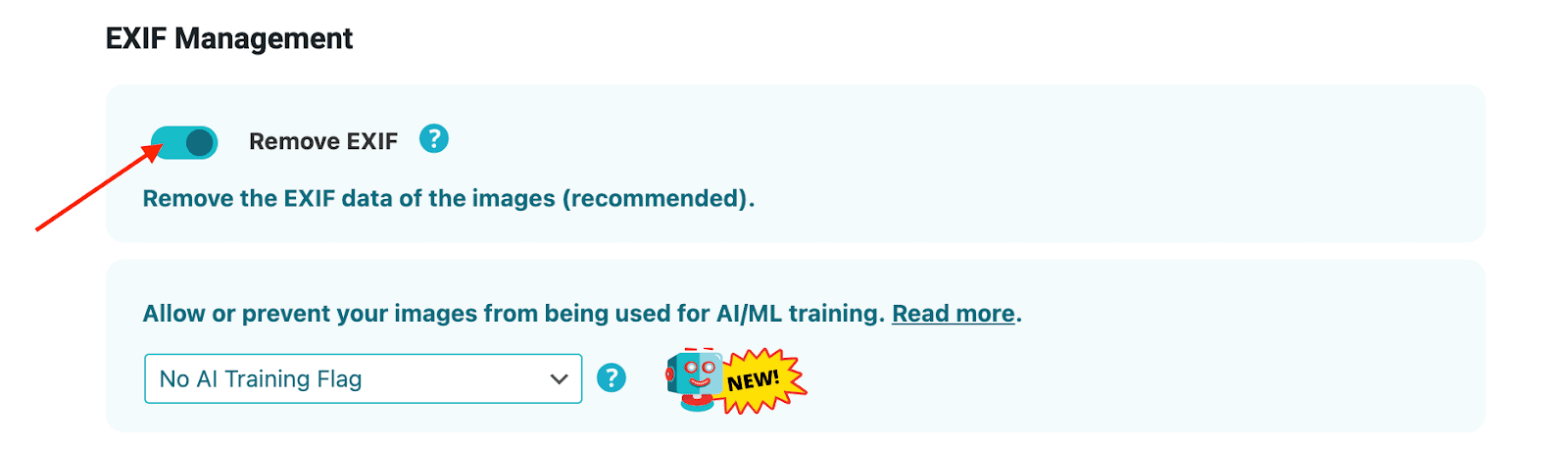
When you disable it, comments, IPTC markers, and XMP data are preserved alongside the EXIF. The ICC profile stays in either case, that part doesn’t change.
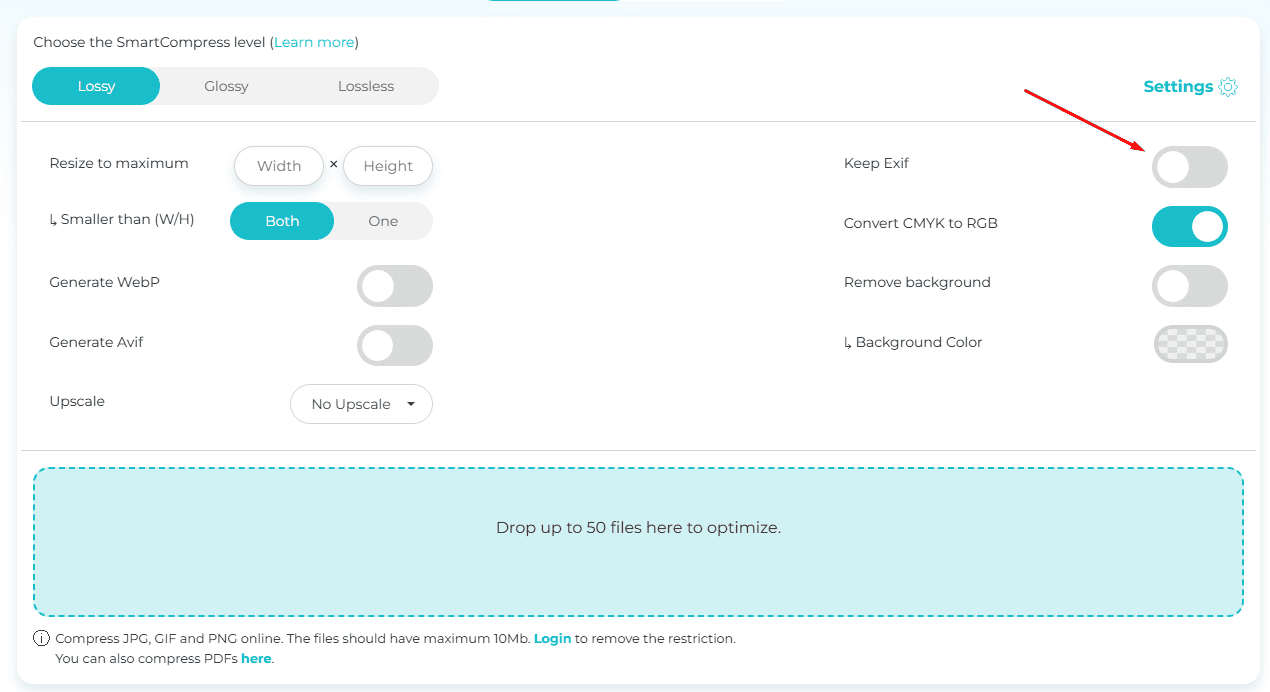
EXIF data can be either preserved or removed when optimizing images with the Online Optimizer too!
Copyright metadata — the exception
Even with “Remove EXIF” turned on, it’s worth knowing what IPTC data does and why some people choose to keep it.
IPTC fields, copyright notices, author credits, captions, are added intentionally, not automatically. A copyright notice embedded in an image can travel with that file if it gets downloaded and reshared, which is genuinely useful for editorial photographers and content creators who rely on attribution.
For most website owners this won’t matter much. But if you’re licensing work or running a site where image credit is important professionally, turning off “Remove EXIF” in ShortPixel to preserve IPTC is a reasonable call. Just know that it will also keep the other EXIF fields, so it’s a bit of an all-or-nothing choice at the moment.
XMP editing history falls in the strip-it camp regardless. There’s no reason for your Lightroom workflow to be embedded in a published web image, it adds weight and exposes your process without giving anything back.
Does this affect SEO?
Not in the way most people worry about.
Google doesn’t use EXIF as a ranking signal. Stripping it won’t hurt your image SEO. The things that actually move the needle, filename, ALT text, surrounding content, are completely separate from embedded metadata.
Where it does help is indirectly. Smaller files load faster. Faster pages score better on Core Web Vitals. Core Web Vitals feed into rankings. ShortPixel’s compression handles the heavy lifting on file size, and stripping EXIF is one more piece of that, every bit of unnecessary data removed adds up across a full site over time.
FAQs
Does stripping EXIF affect image quality? No. EXIF is separate from the pixel data. Removing it changes the file size slightly but has no effect on what the image looks like. ShortPixel strips it by default without any impact on the compressed output.
Will ShortPixel ever remove my ICC profile? No. ShortPixel never removes ICC profiles, regardless of the “Remove EXIF” setting. This is intentional, stripping the color profile can cause visible color shifts, so it’s kept in place automatically.
What happens if I turn off “Remove EXIF” in ShortPixel? When you disable that option, EXIF data is preserved along with comments, IPTC markers, and XMP data. The ICC profile stays regardless. This is useful if you’re a photographer who needs to keep shooting metadata or attribution information intact.
How can I check what metadata is in my images? ExifTool is the most thorough option. For a quick browser-based check, Online EXIF Viewer works well, just upload an image and it shows you everything. It’s also a good way to verify what ShortPixel has removed after processing a file.
Is GPS data in photos actually a risk? Yes, and it’s more accessible than most people realize. There are free tools online that extract it from an uploaded image in seconds. ShortPixel’s default behavior, stripping EXIF on compression, means this gets handled automatically without any extra effort on your part.
Final thoughts
The default approach of stripping all metadata isn’t right, and neither is keeping everything. ICC profiles are worth preserving, they’re small and they matter for color accuracy, and ShortPixel never removes them regardless of your settings. EXIF is a different story: the GPS data alone makes stripping it the sensible default, and ShortPixel does that automatically. If you’re a photographer or publisher who needs attribution data intact, turning off “Remove EXIF” in the plugin settings keeps your IPTC and XMP markers too.
Get the defaults right, and most of the work takes care of itself.
Ready to take control of your EXIF data?
Try ShortPixel for free and see how you can keep both quality and small file sizes.