HTTP/3 for Image Delivery: What Changes (and What Doesn’t) for Core Web Vitals


HTTP/3 keeps coming up in performance conversations. Hosting providers mention it, CDNs advertise it, PageSpeed audits reference it. But what does it actually mean for your images and your Core Web Vitals scores?
Turns out, some things change, some things don’t. And knowing which is which saves you from chasing the wrong fixes.
What is HTTP/3?
Your browser and your server talk to each other using a protocol. HTTP/3 is the newest version of that conversation.
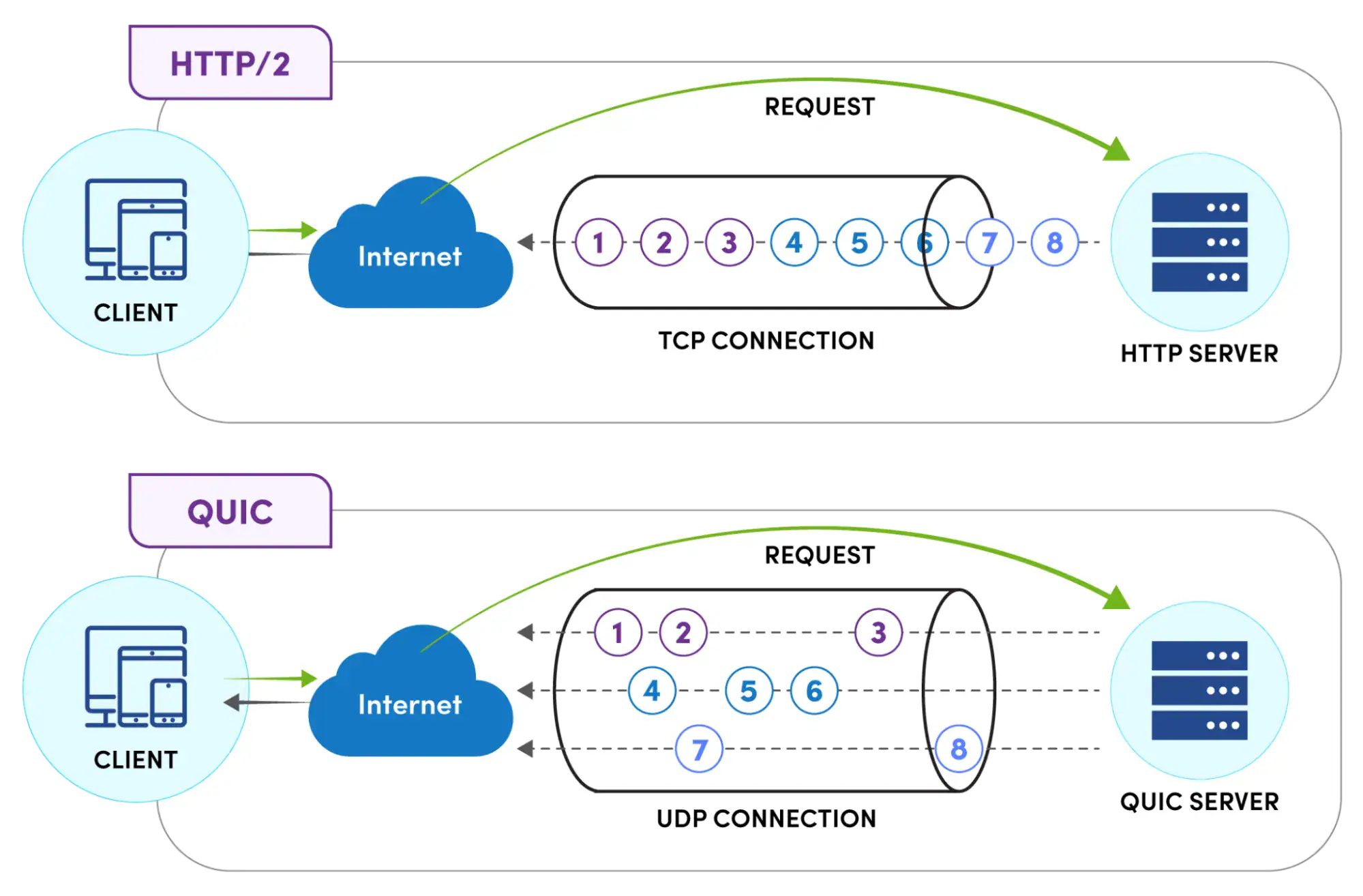
What changed under the hood: HTTP/1.1 and HTTP/2 both ran on TCP. That’s a transport protocol from the 1970s, reliable, but old. HTTP/3 runs on QUIC instead, which sits on top of UDP.
The practical difference comes down to one problem TCP has always had. When a data packet goes missing, TCP makes everything wait until that packet gets resent. Every resource in the queue, your hero image, your CSS, your fonts, all stuck. This is head-of-line blocking. On a page loading 30+ files at once, it’s a real drag.
QUIC doesn’t have this problem. Each file gets its own stream. A missing packet for one image doesn’t touch anything else. Everything else keeps downloading.
There’s also a handshake improvement. HTTP/2 needed several back-and-forth exchanges before any data could move. HTTP/3 cuts that down. For someone visiting your site for the first time, the browser gets to start downloading content faster.
What actually changes for images
Some scenarios benefit more than others.
Image-heavy pages. If you’ve got a WooCommerce product page with 15 photos, or a portfolio with a grid of images, those are all downloading at the same time. Under TCP, one bad packet stalls multiple downloads. Under QUIC, they’re independent. One slow image doesn’t hold up the rest.
Mobile users on the move. Phones switch between WiFi and cellular constantly. Under HTTP/2, that network switch kills the connection and forces everything to restart. QUIC handles it differently, the session migrates with the network change. No restart needed.
First visit, new connection. HTTP/3 needs fewer round trips to establish a secure connection. That directly reduces the time before the browser can start fetching your LCP image.
Visitors far from your server. The farther data travels, the more those round trips add up. HTTP/3’s efficiency shows most at geographic distance or on high-latency connections.
What stays exactly the same
Worth being honest about this part.
A 3MB unoptimized JPEG is still 3MB over HTTP/3. The protocol moves data more efficiently, it doesn’t compress it. If your images are too big, you still need to optimize them.
LCP is still mostly an image problem, not a protocol problem. The 2024 Web Almanac found 73% of mobile pages have an image as the LCP element. Compressing that image, using WebP or AVIF, and making sure the LCP image URL appears in your initial HTML, those moves still matter more than what protocol delivers it.
CLS has nothing to do with HTTP/3. Layout shifts come from elements without defined dimensions, fonts swapping in late, ads pushing content around. Transport protocol is irrelevant here.
INP is mainly a JavaScript execution issue. Getting scripts downloaded slightly faster helps a bit, but the real INP bottleneck is usually what happens on the main thread after download, not the download itself.
So what does this actually do for Core Web Vitals?
LCP — yes, it helps. Faster connection setup and better parallel loading both feed into LCP improvements. On mobile with variable networks, you might see 20–30% gains. On a desktop with stable broadband, the difference is hard to measure.
CLS — nothing changes.
INP — barely anything, in most cases.
The sites that gain the most: lots of images loading in parallel, visitors spread across different countries, high mobile traffic. The sites where HTTP/3 barely moves the needle: mostly text content, desktop-heavy audience, already running a good CDN setup close to users.
Do you need to do anything?
For most WordPress site owners, probably not.
ShortPixel’s CDN already supports HTTP/3. If you’re using it to serve images, your images are already going out over HTTP/3 to any browser that handles it, which is basically all of them. Chrome, Firefox, Safari, Edge. No settings to change. Simply enable CDN delivery in ShortPixel Image Optimizer or use ShortPixel Adaptive Images, and you’re all set!
To check if it’s working: open Chrome DevTools, go to the Network tab, reload, find your images in the list. The Protocol column will show h3 if HTTP/3 is active.
If you’re on older shared hosting, check with your provider whether HTTP/3 is enabled. Nginx has supported it since version 1.25.0, it’s not new at this point, and most managed WordPress hosts have it on by default.
Bottom line
HTTP/3 is genuinely useful, particularly for mobile users and pages with lots of images. It’s not hype.
But it’s not a shortcut either. Unoptimized images delivered over HTTP/3 are still unoptimized images. The protocol helps most when the rest of the stack is already in good shape, compressed images in WebP or AVIF, a CDN with edge nodes near your visitors, LCP image prioritized correctly.
If you’re using ShortPixel’s CDN, you’re already covered on the HTTP/3 side. The image optimization part is where the bigger wins are.
FAQs
Does HTTP/3 automatically fix my Core Web Vitals?
No, it helps LCP in specific conditions but doesn’t fix poor image optimization or layout shift issues. The bigger CWV improvements still come from compressing images, using modern formats, and fixing what PageSpeed Insights flags.
Do I need to set anything up?
If you’re on ShortPixel’s CDN, nothing, HTTP/3 is already on. For hosting, check if your server runs Nginx 1.25+ or LiteSpeed. Most managed WordPress hosts support it out of the box.
All browsers support HTTP/3?
The main ones do, Chrome, Firefox, Safari, Edge. Covers the vast majority of visitors.
Does HTTP/3 help CLS?
No. CLS is about layout stability, nothing to do with how data is transported.
HTTP/2 vs HTTP/3 for images, what’s the real difference?
HTTP/2 multiplexing still had TCP’s blocking problem underneath. One dropped packet could pause several image downloads at once. HTTP/3 gives each image its own QUIC stream, a packet problem with one image doesn’t affect anything else loading at the same time.
Try ShortPixel on WordPress for free!
Easily optimize your pictures and cut down pixels fast using ShortPixel Image Optimizer.